Showing posts with label nokia. Show all posts

Sunday, November 23, 2014

Five reasons to buy a Nokia Lumia 630 compared to Nokia Lumia 520

Nokia
This week we are gonna watch the new terminal of the Finns the newNokia Lumia 630is coming to thedifferent markets.

It is a terminal that is not going unnoticed at all, and unfortunately not for the good of Nokia, since many users were expecting a jump in specifications with respect to the current input range of Windows Phone, theNokia Lumia 520 popular.
MatesWindows Phone Centralhave highlighted five reasons to purchase the new terminal of the Finns, not the Nokia Lumia 520.

Reason # One: Clear-Black Technology and Corning Gorilla Glass 3

The new Nokia Lumia 630 has Nokia technologyClear-Black for a better view of the screen outdoors, like their high-end brethren.It also offers ultimate protection manufacturerCorning Gorilla Glass 3, improving resistance to falls that can cause rough running out of the terminal screen.

Reason # Two: Most powerful and efficient processor

The Nokia Lumia 630 features a Qualcomm Snapdragon processor 4001.2 GHz quad-coreclock frequency, supporting Miracast.improving the long-standing Qualcomm Snapdragon S4 dual-core 1 GHz Qualcomms new is compatible with Nokia sensor that will tell us our beats thanks to the Bing Health & Fitness application when we practice sport.

Reason # Three: Better battery

The new terminal of Finnish incorporates a1830 mAh batteryenabling up to 13.1 hours of talk time, while the Nokia Lumia 520 is formed with a 1420 mAh battery offering 9.7 hours talk time.

Reason # Four: Best Camera

Both have a 5 megapixel camera without flash with the same dimensions in the same sensor and lens aperture of f/2.4.However, the Nokia Lumia 630 has the latestfirmwareavailableCyan Lumiabetter correcting noise in photographs.The Nokia Lumia 520 like the rest of the rangewill be updated to Windows Phone 8.1.

Reason # Five: Serial Windows Phone 8.1

Carrying the latest operating system series, is always an advantage for users, and with all the improvements made ​​Windows Phone 8.1.For many users this point can be very decisive.

Saturday, November 22, 2014

First image of the Nokia Lumia 530

Nokia
During the last event in the Build conference Microsoft presented its latest handsets Nokia Nokia Lumia 930, Nokia Lumia 635 and Nokia Lumia 630, the latter has already begun to be distributed in several markets.However many expect a new low-end Nokia Lumia comes succeed 520, which is currently the best selling terminal with Windows Phone platform.Today we showed what could be thefirst imageof the upcoming Nokia Lumia 530.
Weeks ago has been speculating that the new terminal Nokia input range.First was the Evleaks itself through Twitter, who posted that the codename Nokia Rock is actually the Nokia Lumia 530. Also several weeks ago we discussed yourinternal namemay beRM-1027.A few days ago Evlekas returned to give a code name, in this case Nokia Rise, which would be the version of the Nokia Lumia 530 for the U.S. carrier T-Mobile.
Successor
In the filtered image can see that could be the Nokia Lumia 530, along with the other two terminals recently presented by Nokia.We can see that would have a design similar to theNokia Lumia 630, as their edges are more rounded.It will include physical navigation buttons back, home and search.Your screen would also be less than its big brother, goes 4 or 4.3 inches.Like the Nokia Lumia 520 will suffer from front camera.
At the top we see the Nokia logo is still maintained, so Microsoft will continue to use the badge for their upcoming Finnish terminals.The Nokia Lumia 530 may have 512 MB ​​of RAM, despite criticism from many users on this feature in the Nokia Lumia 630. What is clear is that if you want to return to reap the same success with the Nokia Lumia 520 will have to maintain the excellent quality of the terminal at a very competitive price, and we are seeing very interesting bets as the Motorola Moto E that will cost only 119 euros.
What features does it have the Nokia 530 Lumia to be a bestseller?

Friday, November 14, 2014

10 Best Nokia Lumia 620 Apps

The cheap, chunky and usually quite cheerful Nokia Lumia 620 is one of the more affordable ways to get into the Windows Phone 8 universe, with Nokia and the networks managing to get it into the hands of buyers for around £150 on PAYG SIMs.


Nokia and Microsoft have already done a pretty decent job of pre-loading the Lumia 620 with loads of awesome apps. Nokias Maps location tool is useful, its integrated Drive satnav software helpful, plus the excellent Nokia Music and the... interesting City Lens, so new smartphone buyers can find some top drawer stuff on the 620 to amuse them for the first few days of loving exploration.

But thats still not enough. Microsofts app shop is expanding at a massive rate as Windows Phone adoption increases among users and developers alike, with the listings featuring some great, and usually free, ways to make your MS-powered smartphone smarter still.

These are ten of the best apps that help improve your Lumia 620s existence.

UC Browser

Download from the Windows Phone Marketplace
No offence to Microsoft or its big dream of world domination, but theres still a little bit of shame attached to using Internet Explorer these days, even when its the new mobile version that comes as part of its Windows Phone OS.

Plus, due to the Lumia 620s rather limited RAM, using IE on the 620 can be a bit of a clunky experience.

UC Browsers a little lighter and quicker and, although not flawless, may work better with some of the mobile sites you frequent.

Plus its stacked with options to play with, like a screen-altering Night Mode, incognito browsing, offline caching of embedded videos and more.

BBC iPlayer

Download from the Windows Phone Marketplace
After much waiting and literally millions of angry internet comments demanding to know its whereabouts, the BBC has finally pushed out a version of its mobile iPlayer app for Windows Phone users.

The apps only compatible with phones that run Windows Phone 8, meaning owners of older phones are a little bit stuffed, but at least it means Nokias cheap WP8 model has one very large selling point.

You get 3G and Wi-Fi streaming here, the full seven day archive of shows and background radio playback, but sadly no option to download stuff to watch when offline.

Lomogram

Download from the Windows Phone Marketplace
Windows Phone is lacking any form of official support from beloved hipster lunch-sharing photography app Instagram, but thats kind of OK as there are heaps and heaps of alternative photo editing and sharing apps available on WP8.

Lomograms one of the cutest options, letting users choose from loads of lighting effects, filters and frame borders, then chuck the edited results up to all of todays popular social networks.

BT Wi-Fi

Download from the Windows Phone Marketplace
Make the most of your Lumia 620s Wi-Fi support by instructing your phone to always connect to an active BT Wi-Fi hotspot with this clever little app. It sits on your phone, waiting for you to walk through or sit down within the range of any BT Wi-Fi (previously known as BT Fon) hotspot, then instantly connects on your behalf.

No logging in, no web sites asking for passwords or £5.99 for an hour, just instant internet without fuss. Life = a bit better for BT internet subscribers.

Viber

Download from the Windows Phone Marketplace
One of the many data-based voice chat tools out there, Vibers popular thanks to being free to use, cross-platform so you can talk to your smug iPhone and Android using mates.

Plus, like amazingly commonplace rival WhatsApp, it reads through your Lumias contacts list, finds anyone else whos using the service, and lets you call them direct - cutting your networks calling time limits out of the equation.

KIK Messenger

Download from the Windows Phone Marketplace
If youd rather us a more text-based messaging tool, try KIK. Its even closer an experience to text chat darling WhatsApp, letting users share photos, set up group chats and receive visual confirmation that your target has received your message, all presented in a clean and tidy style thats right at home within WP8s slick layout.

And its free. Its a no-lose situation.

Wikipedia

Download from the Windows Phone Marketplace
The enormous encyclopaedia doesnt have an official Windows Phone 8 app, but thats not really an issue as this indie option is absolutely superb.

The developer has incorporated live tile support, voice searching, an offline mode, article revision history viewing and much more into this app, making it the best way to scan for possibly true facts via your Lumia. But be careful.

There are a few crappy "Wikipedia" apps on the WP8 app store and some terrible paid search tools, so check the user feedback before installing.

Netflix

Download from the Windows Phone Marketplace
One of the blowing-up big names of the mobile world has been available on Windows Phone 8 for some time, offering subscribers of the streaming film service a simple way to user their mobiles as a miniature portable TV.

Obviously its useless without a subscription, mind, although newcomers signing up today qualify for a one-month free trial, along with unlimited access to the sites archives.

Sleep

Download from the Windows Phone Marketplace
As well as the high-profile, Triple-A monster apps, there are also a fair number of quirky little things to play with on WP8. Sleep describes itself as a "sound mixer" tool, playing "soothing" music to the user under the pretence that it may help him or her get to sleep.

Its more likely to remind you your phones there on the beside cabinet at 3:45am and encourage you to wake up and check your emails and go on Twitter for a bit, but still: thats also quite useful in itself.

Mixtapes

Download from the Windows Phone Marketplace
For music fans after something a little off piste, there this. Mixtapes is built around user-generated playlists of tracks pulled from YouTubes enormous directory of tunes, letting players stream endless mixes put together by others.

Its basically a personal radio station you compile then share online, or a great way to root out online rarities and collect them for listening yourself without the hassle of downloading/buying/uploading them individually. 

Friday, October 10, 2014

How to Find a Lost Nokia Lumia 520


Losing a phone is sort of a matter of life and death these days especially if you have confidential files on it. If you misplaced your phone or someone has stolen it, then keep calm and follow the steps below so you can locate your phone and lock or delete all data on it remotely. All you need to have is a Microsoft account on your phone.


1. On your computer, laptop or tablet, go to www.windowsphone.com

2. Then sign in using the same Microsoft account as on your phone.

3. Choose find my phone. From there you can:

> locate your phone on a map
> make your phone ring even if its in silent mode
> lock your phone and set it to show a message so it can be returned to you
> delete all data from your phone remotely

Also check: Nokia Lumia 520 Tips and Tricks

Friday, October 3, 2014

Nokia unveils 3 new models Asha 305 Asha 306 Asha311


Published June 6, 2012 | By Nokia - Press Release

Nokia accelerates the journey to mobile internet with the introduction of Asha Touch device range
Fun, colorful range of touch screen phones will bring fast mobile web browsing, social networks and gaming to millions


Bangkok, Thailand - Nokia has today taken another step towards connecting the next billion consumers by unveiling the Asha Touch family of mobile devices, taking the full touch experience to new price points. The three new phone models - the Nokia Asha 305, Nokia Asha 306 and Nokia Asha 311 - further expand the successful Asha family, first introduced in October 2011. Today, there are 10 Asha devices available in more than 130 markets, providing young, social consumers with a choice of phones to match their own lifestyle.

These latest phones have been designed to provide an incredibly rich, smartphone-like experience to consumers who want to be set free from excessive data consumption costs and short battery life. The Nokia Asha 305, Asha 306 and Asha 311 offer a new, fully re-designed touch user interface, combining the proven ease-of-use from Nokias heritage with digital design innovations specifically fit for the purpose.

The beautifully crafted Nokia Asha 311 is a fast and fluid 3.5G capacitive touchscreen device, powered by a 1GHz processor to provide a great internet experience. The bright and edgy Nokia Asha 305 is a fun and affordable phone, featuring the exclusive Easy Swap dual SIM. Its sister, the Nokia Asha 306, is a single SIM model, and becomes Nokias most affordable Wi-Fi handset to date.

"By introducing the Asha Touch phones to the market, were accelerating our commitment to connect the next billion consumers," said Mary T. McDowell, Nokias executive vice president for Mobile Phones. "These phones deliver on what young, urban people value most -- a great-looking device; and an intuitive and affordable experience for connecting to the internet, to their friends, and to a world of entertainment, web apps and content."

Great for fast, affordable mobile internet and gaming entertainment
The new devices take full advantage of the Nokia Browser 2.0, a major recent update which uses Nokias cloud technology to reduce data consumption by up to 90%, meaning that consumers can enjoy faster and cheaper internet access. Web sites load up to three times faster in comparison to devices without cloud-accelerated browsing, making it simple for users to find and select from more than 10,000 web apps available for download. They deliver a richer and more interactive consumer experience whilst using less data than a stand-alone internet connected app.

Consumers can easily stay connected with friends and family at the touch of a button as well as share files and links across their social networks. Furthermore, the Nokia Browsers Download Manager feature helps consumers to manage external content easily, saving music, video or pictures on a memory card, while surfing the internet.

The Asha family is also getting positive support from developers and consumers. Nokia Store has just broken the 5 billion downloads landmark. From January to April, 42% of all content downloaded from Nokia Store was delivered to Asha and other Nokia devices based on the Java ecosystem. Just one year ago, that number was 10%. Also, there are 410 Nokia developers with apps which have achieved more than 1 million downloads. India Games and Pico Brothers just passed 100 million.

As well as providing a great, social online experience, the Nokia Asha 305, Asha 306 and Asha 311 have been created with entertainment in mind. All users will receive an exclusive gift of 40 EA games to download for free* and keep forever. These games range across action, arcade and sports, and include titles such as Tetris®, Bejeweled®, Need for Speed(TM) The Run and EA SPORTS(TM) FIFA 12. The Nokia Asha 311 also comes with 15 levels of Angry Birds pre-loaded onto the phone, perfect for making the most of the touchscreen and 1GHz processor.

"Nokia is taking another interesting step forward in connecting consumers to the Internet, seeking to improve their experience through a new touch user-interface that is allowing the company to compete in new mass-market price bands. The mass-market is a competitive segment, but we believe Nokias upgraded Asha portfolio has included an attractive package that can enable consumers to have lower running costs, taking advantage of things like its compressed browser and a long-life battery", says Neil Mawston, Executive Director of devices research at Strategy Analytics. "It is also interesting to see how Nokia is promoting its Asha strategy with global launches taking place in important high-growth markets such as Asia. Nokia resonates well there and the response from local consumers is likely to be positive".

Product details

The Nokia Asha 311 is a colourful, compact touch screen device that comes with all the features youd expect for a fun and easy mobile experience. It boasts a bright and colourful, scratch resistant capacitive glass screen with polarization filters ensuring users get the best experience from the unique and visually entertaining user interface. The Nokia Asha 311 also features a 3.2MP camera and pre-installed Nokia Maps, in addition to the 15 level pre-bundled version of Angry Birds.

Nokia Asha 311

The pre-loaded social client makes accessing Facebook, Twitter and many other global social networks simple while Nokia Browser makes using mobile internet fast and affordable. It also includes the most popular messaging services. "WhatsApp has a clear vision of creating a reliable and easy to use cross-platform messaging application that enables people to stay in touch with their family and friends from all around the world," said, Brian Acton, Co-Founder of WhatsApp Inc. "By partnering with Nokia whose worldwide reach in mobile is well established, WhatsApp becoming available for the Asha Touch devices will enable us to further realize our core mission".

The Nokia Asha 305 is a fun and entertaining Easy Swap dual SIM phone, helping users make the most of their phone while retaining control of their costs. The phone features a bright and colorful 3" WQVGA resistive touch screen along with Bluetooth and Dual Band connectivity. Forty EA games are available for download with every phone as well as a 2MP camera, Nokia Maps and the revolutionary Nokia Browser which helps significantly lower data costs.

Nokia Asha 305

The Nokia Asha 306 is the sister device to the Nokia Asha 305. Along with all the great features that come with its sister, such as bright and colorful, 3" WQVGA resistive touch screen and 40 EA games for download - a Nokia exclusive offer, the Nokia Asha 306 also provides WLAN, enabling users to stay connected while on the move. It also supports video streaming through both GPRS and WLAN, meaning this handset truly is a fun way to stay in touch.

Nokia Asha 306

The estimated retail price for Nokia Asha 305 is EUR 63 and its expected to start shipping in the second quarter of 2012. The estimated retail price for Nokia Asha 306 is EUR 68. The Nokia Asha 311 has an estimated retail price of EUR 92. Both devices are expected to start shipping in the third quarter of 2012. Above mentioned prices exclude taxes and subsidies. The new devices images are available at Nokia.com/press.

*Data costs may apply.


Thursday, October 2, 2014

Nokia 112


The smart and fast way to browse the web, share and chat, with a powerful battery to keep you in touch.

Web browsing is easy, fast and cheap, with compressed pages for quick downloads and lower data changes.

Stay online, chat, email and talk longer with a powerful battery that gives you up to 8 hours talk time and 28 days on standby.

Call, text or browse in the network you prefer - swap SIM cards easily without even turning your phone off.

(Source: Nokia)


Tech Specs:

Nokia 112
General and Software
Codes / Prices 38,00 €
Form Factor Candybar
Operating System Nokia OS (S40)
Physical Keyboard Numeric keypad
Announced 15 May 2012
Status Available Q3 2012
Browser & Internet Nokia web browser – Series 40 OSS Browser - XHTML – WAP 2.0 - HTML over TCP/IP - HTML 4.0 (XHTML 1.1) - XHTML over TCP/IP
Java Yes
Display
Size, diagonal 1.8 megapixels - 45.72 mm
Display Resolution QVGA 128 x 160 pixels
Generalized Pixel Density 114 dpi

TFT LCD transmisive – 65M colors
Connectivity
WAN / Network 2G GSM 900 / 1800 Mhz – Dual SIM, 2 slots
WAN / Network 3G No
WAN / Data GPRS / EDGE
EGPRS MSC 9 - 236.8 Kbps
EGPRS MSC 4 - 59.2 Kbps
4G No
Wireless LAN No
Bluetooth Bluetooth 2.1 + EDR
USB No
Audio jack 3,5 mm Nokia AV 3.5 mm
GPS / Location Based Services No

3.5mm Charger Connector
2.0mm Charger Connector
Camera
Camera Resolution (max) VGA 0.3 megapixels – 640 x 480 pixels
Camera secundary No
Camera Focus No
Camera Flash No
Camera Zoom (max) Digital zoom 4x
Image Capture Formats JPEG
Additional Camera Features Self-timer – Still image Editor - Exposure Compensation - Full screen viewfinder - Auto and Manual White Balance settings - Active toolbar - Landscape orientation.
Scene modes: Landscape – Portrait
White balance modes: Automatic - Daylight - Fluorescent – Incandescent.
Photos viewed by: Album - Slide show - Photo editor

Aperture f2.4
Media
Audio Player MIDI – AMR-NB - AMR-WB - MP3 - WMA 9 - AAC LC - GSM FR - WMA 10 - WMA 10 Pro - A-law – mu-law.
Audio Recorder AMR
Video Player H.263 – WMV - 3GPP formats (H.263) - AVI - ASF
Video Recording VGA – 176 x 144 pixels – 10 fps

OMA DRM 2
Speakerphone Yes
Loudspeaker Yes
Radio FM Stereo FM RDS Radio - Radio recording
Voice Recording Yes

Selection by artist, composers, album and genre – Album graphics display – Playlists.
Video colour tone modes: Normal - Greyscale - Sepia - Negative - False colours – Solarize
Video white balance modes: Automatic - Incandescent – Fluorescent.
Video scene modes: Portrait - Landscape
Processor and memory
RAM 16MB
ROM 64MB
Internal memory 10MB
Memory Card Type MicroSD
Memory Card Size Supported Up to 16GB
Sensors
Ambient Light Sensor No
Notifications Vibration – MP3 - Polyphonic
Power
Battery Type Standard Li-Ion BL-5C 1400 mAh
Talk time Up to 14 hours
Stand-by time Up to 839 hours

Music playback up to 27 hours – Video playback up to 10.5 hours
Divers
Messaging Nokia Messaging 2.0, Nokia Email (IMAP4, POP3, SMTP). SMS, MMS+SMIL, AMS, IM – Nokia Chat, Windows Live Messenger
Games Java games (40 key EA Games)
Color Black, white, red
Phone Book up to 1000 entries in total
Organizer Yes
Agenda Yes
Calendar Yes
Task Yes
Notes Yes
Voice memo Yes
Predictive text Yes
Watch Yes
Alarm Yes
Diary Yes
Calculator Yes
Flight mode Yes
Weight 86 grams
Dimensions 110 x 46.9 x 15.4 mm

Facebook – Twitter

Local SyncML sync. - Remote SyncML sync. - OMA Data Sync. v1.2 - SyncML

FOTA Firmware over the Air – Nokia Life Tools - Themes - Nokia Store

Security: Device lock – Device passcode - Secure device start-up - PIN code

Physical Keys: Send - Internet - End - 5-way Navi Key - Combined End and Power key

Dedicated hardware key: Power Key - Menu Key - 3 Labeled Soft Keys

Call management features: Voice mail - Automatic redial - Call diverts - Call waiting - Fixed Dialling Number - Integrated hands-free speakers - Automatic answer - Call barring - Call forwarding - Anykey answer - Speed dialling - Call logs: dialled, received and missed - Conference calling
Package contents

Nokia 112 handset

Nokia Battery BL-6C, 1400 mAh

Nokia Stereo Headset WH-102

Nokia Charger AC-11 (global)

Compact Visual User Guide
Ecological measures

Eco content and services available at Nokia store

Energy efficiency: Unplug charger reminder - Energy efficient charger

Free of PVC - Free of nickel on the product surface - Free of brominated compounds

User guide: Black & white printing - Green tips page

Packaging details: 100 % recyclable - Minimized package


Gallery:


Resources: 

Official website MEA english - Nokia 112
Press: Nokia introduces new range of mobile phones to provide a fast, affordable internet experience


Wednesday, October 1, 2014

How to Download Apps on Nokia Lumia 520


Do want to jampacked your Lumia 520 with cool apps and games. Then try checking out their own version of app store to download free apps, games and other stuff for your Lumia 520 phone. Heres how to download those stuff on your phone.

1. First tap the Store iconon your device.

2. Then tap an item to view its details like the price, description, rating and etc.

3. If the said item has a price, tap buy or if its available for free at a limited time, tap try. If its free, go ahead and tap install.

4. If youre not signed in to a Microsoft account, then sign in now.

5. And just follow the on-Lcd instructions to complete the download.

When the download is complete, you can open or view the item, or continue browsing for more items at the store. But even if youre still downloading the item, you can continue to browse for more items and even add an item to your download queue. To view your download queue just tap the download notification at the bottom of the main view. If you want to pause the downloading, tap and hold the downloading item and tap pause. Tap resume to continue the download.

Also check: Nokia Lumia 520 Tips and Tricks


Sunday, September 28, 2014

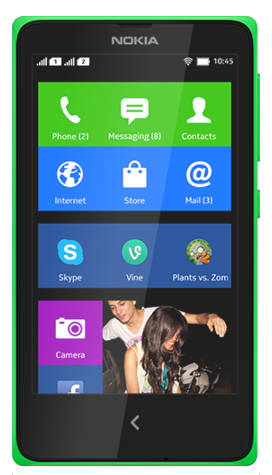
Nokia X Dual Sim Tips and Tricks How Tos

It is very important for you to know some tips on your device like Nokia X. It will help you learn more about your device to make your life much easier in using it. Improving your productivity and fulfilling what you expected on your Nokia X.

Here are some How Tos for your  Nokia X. These is still not yet complete and I am still working on the others, visit more often for updates.


How to Hard Reset Nokia X

Resetting your Nokia X Dual SIM will restore the default settings of your device. It will also delete all your files on your phone, so it is recommended to have a backup of your important files on your computer.

Hard Key Combination:

Use this option if your device is locked and you dont know the code.

Note: Make sure that your Nokia Lumia is turned off.

Step 1. Press and hold the power key until it vibrates then release.

Step 2. Press and hold the down key volume. If the exclamation mark will be shown on the Lcd, you can now release the button.

Step 3. You need to input these key combination:

Volume Up > Volume Down > Power Volume Down.

Your phone will reset and will boot up automatically. This might take a several minutes.


How to Import Contacts From Old Phone to New Phone (on iPhone, Samsung, HTC and Nokia)

Contacts is very important for everyone of us. We cant connect to our friends without a contact number. If you have a new phone, saving contacts on the phone one by one is so hassle. But now, theres an easy way how to transfer or import your contacts from your old phone to your new phone.

Use your PC to transfer contacts to your new phone. This process is applicable in several phone brands, including iPhone, Samsung, HTC and Nokia.

You just need an Internet Connection on your PC, your old and new phone and their own USB cable.

Then you need to install the PC Companion program. This is a free application and the installation files are already saved on your new phone. This program can also be used in updating your phone software.

Please note that if you are using the Microsoft Windows 7 operating system on your PC, make sure that the AutoPlay setting is enabled.

To check your settings:

Click Start > Control Panel, then type "autoplay" on the search box. Click the AutoPlay, and mark the check box Use AutoPlay for all media and devices.

Installing the PC Companion:

  • Turn on your new Phone and connect it to your PC.
  • On your new Phone, tap "Install" to install PC Companion on the PC.
  • On your computer, if a pop-up window that appears notifies you about available PC Software, select Run Startme.exe.
  • Then click Install to start the installation and then follow the instructions to complete the installation.

If you are not prompted with a pop-up window to install the PC Companion, you can also download the PC Companion here.

Transferring your contacts to your new phone:

  • Make sure that PC Companion is installed on your PC.
  • Open the PC Companion application on your PC.
  • Then click Contacts Setup and follow the instructions to transfer your contacts.


How to Extend Battery Life of Nokia X

Battery Life depends on how you use your device. For Nokia X device, if you want to save your battery to last longer hours, you may need to adjust your settings. Follow these suggestions:

  • Charge wisely. Always charge the battery fully.
  • Select only the sounds that you need. Mute unnecessary sounds, such as key press sounds.
  • Use wired headphones. Use the loudspeaker selectively.
  • Lower the backlight brightness. Tap on the Gear Icon or Settings > Display > Brightness, and drag the slider.
  • Set the backlight to switch off after a short time. Tap on the Gear Icon or Settings > Display > Sleep, and select the length of time you want.
  • Use network connections selectively:
  • - Switch Bluetooth on only when needed.
  • - If youre listening to music or otherwise using your phone, but dont want to make or receive calls, switch
  • flight mode on. Tap on the Gear Icon or Settings > Mobile data and networks, and switch Flight mode on.
  • Restrict background mobile data Tap on the Gear Icon or Settings> Data counter, swipe up from the bottom of the Lcd, and tap Restrict background data.


Set up your mail account

Do you use more than one mail address? You can have several mailboxes on your phone. You must be connected to the internet to add a mailbox.

1. Tap @, write your mail address and password, and tap Next.
2. Change the account settings to your liking, and tap Next.
3. Write your name, and tap Next.

Add a mailbox later

Tap @, swipe up from the bottom of the Lcd, and tap Settings. Then tap , and set up the new
account.

Switch off the automatic update of the inbox

Tap @, swipe up from the bottom of the Lcd, and tap Settings. Then tap the account and Refresh inbox, and change the settings, if needed.

Your phone updates your inbox at certain intervals to show your new mails when they have arrived. This may cause transfer of large amounts of data, which may result in data traffic costs. To save costs, you can switch the automatic update feature off and update your inbox manually using a Wi-Fi connection.

Delete a mailbox

Tap @, swipe up from the bottom of the Lcd, and tap Settings. Then tap the account and Remove
account.


Download and update maps

Save new maps to your phone before a journey, so you can browse the maps without an internet
connection when travelling.

Make sure you have Wi-Fi networking switched on.

Tap Here icon > Cross Line icon > Download.
1. Tap Download.
2. Select the country or region.

Update an existing map

HERE lets you know when an update is available for a map. Follow the instructions shown on the phone.

Delete a map
Tap the map and Delete.

Get directions to a place

Want to find your way easily? Get directions for walking, driving, or using public transport.

1. Tap Here icon > Arrow icon .
2. If you dont want the start point to be your current location, tap Start, and search for a start point.
3. Tap Finish, and search for a destination.

Get walking directions

After creating your route, tap Walking Person icon. To start navigating to your destination, tap Start. To switch between your location, the next turn, and the route overview, swipe left or right on the info area below the map.

Get driving directions

After setting your destination, tap Car icon. Your route is shown on the map. To see a list of each section
of your journey, tap the destination info area above the map.

Connect to a Wi-Fi network

To help save on data costs, you can use a Wi-Fi network to connect to the internet, whether youre
at home or at a library or internet café.

1. Swipe down from the top of the Lcd, and tap Wi-Fi icon.
2. Tap Wi-Fi networks and the network you want.
3. If the connection is secured, type in the password.

Connect to the previously used Wi-Fi network

Swipe down from the top of the Lcd, and tap Wi-Fi icon.

Add a new network

Swipe down from the top of the Lcd, make sure Wi-Fi is on, tap Wi-Fi networks > Wi-Fi icon , and type in the required info.

Close the Wi-Fi connection

Swipe down from the top of the Lcd, and tap Wi-Fi icon.

Copy content between your phone and computer

Copy photos, videos, music, and other content created by you (and stored on the memory card)
between your phone and computer.

To copy content from the phone memory, you need to have a memory card inserted in your phone.

1. Connect your phone to a compatible computer with a compatible USB cable.
2. On your computer, open a file manager, such as Windows Explorer, and browse to your phone. You
can see the content stored on the memory card.
3. Drag and drop items between your phone and computer.

Send a photo using Bluetooth

Want to send photos youve taken to a friend? You can use Bluetooth to wirelessly send your photos
to compatible devices or to your computer.

1. Make sure Bluetooth is switched on in both devices and they are visible to each other.
2. Tap the photo and Connectivity icon > Bluetooth.
3. Select the device to connect to. If asked, type in the passcode.

Update your phone software

Stay in step with the beat – update your phone software and apps to get new and enhanced features
for your phone.

1. When your phone notifies you of an update, swipe down from the top of the Lcd, and tap the update notification.
2. To download and install an update, tap Update, and follow the instructions shown on the phone