Showing posts with label . Show all posts

Sunday, November 16, 2014

Step By Step – Adding Video To Wikipedia


Adding video, audio or images to wikipedia.org can have a two fold effect on your marketing.
It can be used for either getting quality backlinks to your own content or to hijack traffic from wikipedia.

The quality of the content has to fit in with the article you want to add your multi media content to though. The admins within wikipedia are very quick to delete content they think is not relevant or does not fit with the article or the section of the article.

So the first thing you need to do is choose between what form of multi media you want to add.Here are the three options we have:


Images:
           This is not new, images have been on wikipedia.org for a long time. I found personally the best way to do this was by adding local images of a library, an underground station and adding these images first to my own local seo site and then adding to commons.wikimedia.org and then from there adding them into wikipedia.org in a relevant page about my locality with the file source leading back to the page on my site that the image came from. I found this particularly useful if linking to a content page and I would subtly add some info about a free video training course or a free consultation.

Video:
           This is very new! This gives us a huge opportunity as there are millions of articles on wikipedia and very few of them have video! Its possible to add video you have on sites like youtube and flickr and its also OK to add video from your own site as long as you own the rights to that video. Now we have some options within these options...If using your youtube channel then you can link to your channel, your video URL or you can use your name and link that to anywhere really as long as its to your own stuff on the web. Linking to a google+ profile might be the best way of doing this and it needs to be tested, especially if you are syndicating your youtube channel content to Google+ which can be done by using ifttt.com and in the hootesuite account you link to ifttt.com then make sure you have google+ activated :)

Audio:
           This is another great opportunity especially if you are doing podcasting or curating articles via audio. What you can do here if not, is use content that is freely available as public domain licensed content...for example martin Luther King speech but also link your name to your own content with your name being the vehicle for anchor text to your chosen web page, I would think that linking to your Google+ profile would be acceptable for the wikipedia.org admins!

There are a couple caveats though!
  • Your wikipedia.org user account must be more than 4 days old for video and audio.
  • You must have made at least 10 article edits before being allowed to add video and audio.
  • You cannot add How To Videos... (been there...tried it ...got deleted very fast!)
OK so to add multimedia to wikipedia.org here are the steps needed.


For video (and I think audio but never used audio myself) follow the steps below...
  1. Take a video of something that is relevant to a wikipedia.org article and that you know does not have a video in the section you want to add a video to.
  2. Go to firefogg.org and convert your video file to ogg theora file type (.ovg) and save on your desktop or a folder where you can easily find it.
  3. Go to commons.wikimedia.org and click on the left hand side link that says “Uploads
  4. You will be presented with a wizard, close the first screen and click on next and follow the wizard along to upload your ogg theora video file (.OVG)
  5. Next you will be asked for the rights you have to add this content to wikipedia.org, this is why its best to use your own videos that you created. I choose the first option that this is my own work.
  6. Next it will ask you to add a description, at this point you can simply add more info. and build out the Title into a description. Stick to what your content is about and do not use anything related to affiliate marketing, keep it factual.
  7. Next you will be given a code that you can use on a wiki page. It will look something like this... [[File:Northern Thailand Cuisine Fried Insects At Market Stall in The Floating Market Pattaya, Thailand.ogv|thumb|Northern Thailand Cuisine Fried Insects At Market Stall in The Floating Market Pattaya, Thailand]]
  8. Next go to the wikipedia.org web page and then to the section that you want to edit and click on the edit link directly parallel to the section heading and it will open up the edit section, add your code to the bottom and click preview first to check and if you see your video appear when in preview mode, then you can click save and you are done as far as adding a video to wikipedia.org.
  9. We are not finished yet though, we want to add a clickable link directly from wikipedia.org to your own web page on the web. This can be a Youtube Channel, Google + Profile, Website etc.... So we go back to commons.wikimedia.org and we click at the top where it says contributions. From here we scroll down and find the video file we just uploaded and click on the first edit link you see on the right hand side as you scroll under the video (The video will show on the page)
  10. OK now that we have entered the edit area we have two choices. First we can add a hyperlink to where your name is or we can add a hyperlink to a keyword in the description or we can add hyperlink to where it says file source Own...I have done both with where it says file source own and also where my user name/author name is. I recommend you use your author name. This is done via the hyperlink icon in the edit page which becomes a WYSYWYG editor with toolbar at the top of the edit section. Once you have added your link simply save and then go back and refresh you wikipedia.org page and check that the hyperlink is there.

Thats all there is to it but this can be simplified by using the Wikipedia Video Submitter which is available by registering at my Traffic Academy membership site. It has a free membership level and a premium membership level but the free is more than enough for you to check out some of my other work, video training and software.
Wednesday, October 29, 2014

Samsung updates the Gear Fit with Portrait View Mode – Details

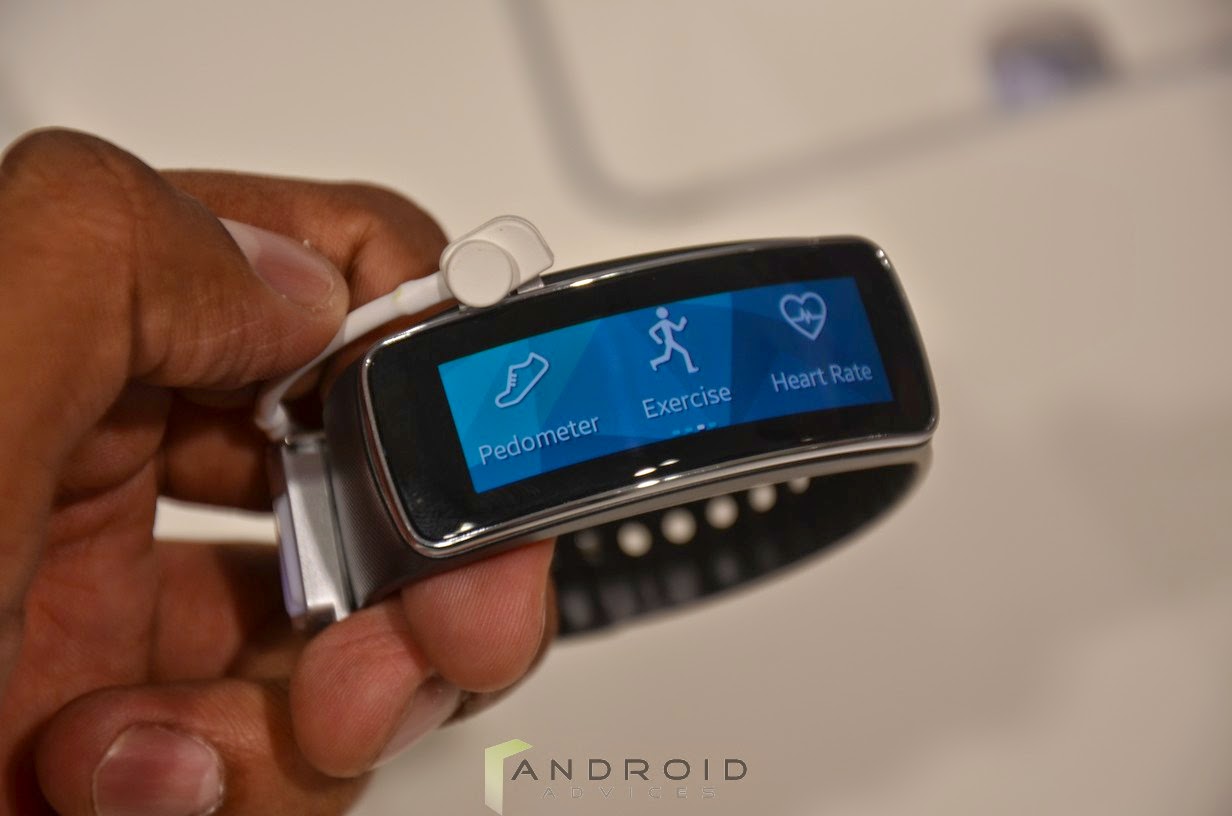
The Samsung Gear Fit is the first fitness band from the company that was unveiled at the MWC 2014 that was held in Barcelona, Spain earlier this year. The device was promising with its large Lcd but it had the drawback of lacking the vertical display that made it harder to use. Now the company has updated the device and the portrait mode UI is given to the device so that it user can use it in the vertical angle also, making easier to use.

Earlier we have seen the Gear Fit in our hands-on-video, photos as you can clearly observe before the update we can only view the options on the Gear Fit in the landscape mode which made it difficult to use, since the user needs to turn the entire wrist so operate the device, getting in awkward position, this update made it easier for the users since the device can be used in portrait mode. It is good to know that the South Korean giant Samsung has solved the issue even before releasing it.


http://android-developers-officials.blogspot.com/2014/04/samsung-updates-gear-fit-with-portrait.html


Let me remind you that the Samsung Gear Fit has a rectangular curved AMOLED touch Lcd display that sits on your wrist perfectly and it has a 1.84 inch display with 432 x 128 resolutions and is also IP67 certified making it Water and Dust resistant. The device does not feature a camera or microphone since it is targeted only for fitness. All the data from the Gear Fit can be synched with Samsung’s S health app.


http://android-developers-officials.blogspot.com/2014/04/samsung-updates-gear-fit-with-portrait.html


This Gear Fit from Samsung will also come with swappable bands in Orange, Mocha Grey and Black colors and the company also claims that the device can deliver 3-4 days of battery live with typical usage. Like the latest flagship from the company, Galaxy S5 and few other Gear smartwatches, even the Fit is IP67 rated for water and dust resistance.

The device will be coming in to the market on April 11th along with the company’s flagship Samsung Galaxy S5 and is also compatible with 17 other Galaxy devices. Stay tuned for more information and updates.

Tuesday, September 30, 2014

HTC One V CDMA – USA – Virgin Mobile – U S Cellular

HTC


With an amazing camera that allows you to easily shoot and share, and a design that doubles as both timeless and durable - the HTC One V is the essential smartphone that keeps you effortlessly moving and connected.

Activate your camera and take that special shot- all in a second’s time. Tired of missing the moment? Now take HD video and pictures at the same time, so you never have to. Be amazed as HTC One V has all the latest in digital technology to ensure you have the brightest, clearest shot possible.

Bringing you right into the recording studio, Beats Audio through your HTC One V will optimize any type of music played. You will experience music as the artist intended. Playing a video, or gaming? Beats Audio enhances all media played on your device to creating rich, premium sounds that enhance any type of entertainment.

Metal-unibody architecture that’s cool to the touch and durable. Slightly curved chin makes the HTC One V iconic and fit smooth in your hand. The premium screen is a delight to the eyes and is made out of reinforced glass and scratch resistant. Designed to look great while working for you, from the inside out.
(Source: Motorola USA)


Tech Specs HTC One V – CDMA
General and Software
Countries USA: Virgin Mobile – U.S Cellular
Form Factor Candybar
Operating System Android 4.0 Ice Cream Sandwich – Interface HTC Sense 4
Physical Keyboard No, virtual QWERTY
Announced 26 June 2012
Status Available June 2012
Browser & Internet HTML, HTML5, XHTML, WAP 2.0
Adobe Flash Support Adobe Flash Player
Java MIDP Emulator
Display
Size, diagonal 3.7 inches - 93.98 mm
Display Resolution WVGA super LCD2 - 480 x 800 pixels
Generalized Pixel Density 252 ppi

Super IPS LCD2 – Capacitive - Touchscreen - 16M colors
Connectivity
WAN / Network 2G CDMA 800 / 1900 MHz
WAN / Data CDMA2000 1xRTT, 1x/EVDO rev. 0, 1xEVDO rev. A
Wireless LAN Wi-Fi IEEE 802.11 b / g / n – Wi-Fi hotspot – Wi-Fi Direct
Bluetooth Bluetooth 4.0
USB Micro-USB 2.0 – Mass storage – Charging connector
Audio jack 3,5 mm 3.5 mm stereo audio jack
GPS / Location Based Services A-GPS
Camera
Camera Resolution (max) 5 megapixels
Camera secundary No
Camera Focus Autofocus
Camera Flash Flash LED
Additional Camera Features BSI sensor (for better low-light captures)
f/2.0 aperture and 28mm lens.

Dedicated imaging chip
Capture a photo in the midst of recording HD video
Continuous shooting mode captures multiple snapshots
Media
Audio Player AAC, AAC+, eAAC+, MIDI, MP3, WAV, WMA, AMR, OGG
Video Player H263, H264, MPEG–4, WMV, 3GP, 3GS
Video Recording 720p HD (1280 x 720 pixels) – 30 fps
Video Playback 720p HD (1280 x 720 pixels) – 30 fps

Universal Beats Audio
Speakerphone Yes
Loudspeaker Yes
Radio FM FM Stereo with RDS
Voice Recording Voice dialing – Voice commands – Voice recording
Processor and memory
Processor / SoC Chipset Qualcomm Snapdragon MSM8655 -- 45nm – CPU Single-core Scorpion 1 Ghz – GPU Adreno 205 – Dual-channel 333 MHz LPDDR2 – Q2 2010
Processor Clock Speed 1 GHz
RAM 512MB LPDDR
Internal memory Total storage:4 GB
Memory Card Type microSD
Memory Card Size Supported Up to 32GB
Sensors
Accelerometer Yes
Digital Compass Yes
Proximity Sensor Yes
Ambient Light Sensor Yes
Notifications Vibration, MP3, WAV, Polyphonic
Power
Battery Type Lithium-ion battery 1500 mAh Embedded
Talk time Up to 7 hours, 12 mins
Stand-by time Up to 10.5 days (252 hours)
Divers
Messaging SMS, MMS, IM, (IMAP, POP3, SMTP), Microsoft Exchange
Games Yes, downloadable
Color Black, Gray, Purple
Phone Book Yes
Organizer Yes
Agenda Yes
Calendar Yes
Task Yes
Notes Yes
Predictive text Yes
Watch Yes
Alarm Yes
Diary Yes
Calculator Yes
Documend Viewer Yes
Flight mode Yes
Weight 115 grams (4.06 oz)
Dimensions 120.3 x 59.7 x 9.24 mm (4.7 x 2,3 x 0,36 in)

Google Mobile services

Computer Synchronization, OTA Synchronization


Gallery:

HTCHTCHTC


HTCHTC


HTC

HTC


Resources: 

HTC USA - HTC One V
Virgin Mobile - HTC One V
U.S. Cellular - HTC One V
User Guide - English -  HTC One V
Guia de Usuario - Español - HTC One V


Saturday, September 27, 2014

Sony Mobile unveils Xperia GX and Xperia SX – the first Sony LTE for the Japanese market


Sony Mobile Communications unveils Xperia GX and Xperia SX – the first Sony LTE smartphones for the Japanese market

Powerful performance and ultra-fast network speed combined with easy connectivity and premium entertainment experiences
Xperia GX features a 4.6” HD screen and 13MP camera for ultra real viewing experiences
Xperia SX is the world’s lightest LTE smartphone weighing only 95 grams
Sony Xperia SX - SO-05D

Sony Xperia GX - SO-04D

9 May, London, United Kingdom - Sony Mobile Communications today announced two new Xperia™ Android smartphones designed specifically for the Japanese market. Xperia GX and Xperia SX join the popular Xperia NX and Xperia acro HD, currently among the best selling smartphones in Japan. Both Xperia GX and Xperia SX enable easy connectivity with multiple screens to share and enjoy content on whichever screen best suits the situation, whether it’s TV, smartphone, laptop or tablet.

Xperia LTE smartphones for Japan
The first Sony branded smartphones to launch in Japan Xperia GX and Xperia SX are LTE enabled with download speeds of up to 75mbps. They come with 1.5GHz dual core processors for faster performance and Reality Display powered by the Mobile BRAVIA® Engine for razor sharp clarity, full HD video and Sony Exmor R™ for mobile, enabling the capture of high quality, bright pictures and HD videos even in low light. With HD sharing through DLNA, and HDMI, controlling the smartphone with the TV remote control when connected to the TV, Xperia GX also deliver a full HD experience on the big screen.

New media applications
Bringing the best of Sony technology and premium entertainment experiences, Xperia GX and Xperia SX also introduce three new media applications:
The “WALKMAN” application integrates signature high quality audio technologies such as clear stereo, clear bass, VPT surround sound, manual equalizer and xLOUD™ with new innovative ways to play, discover and recommend music.
The “Album” application brings new intuitive ways to sort and browse high quality photos and videos in blazing speed, as well as providing instant viewing, commenting and sharing of photos on Facebook and other online albums, leveraging the great camera capabilities of Xperia GX and Xperia SX.
The “Movies” application streamlines the playback and viewing of movies in high quality audio and video with intelligent database search to discover more info about the movie for a rich and immersive experience.

Xperia GX – capture ultra real memories in high definition
Xperia GX boasts a 4.6” HD resolution screen for superior viewing. With a 13MP camera and full HD video recording, Xperia GX enables consumers to capture unforgettable moments in the highest quality, wherever they are. Building on the design success of Xperia arc, Xperia GX incorporates a matte texture and slimline body which fits perfectly into the consumer’s palm or pocket.

Key features for Xperia GX4.6” Reality Display powered by Mobile BRAVIA Engine for razor-sharp clarity.
1.5GHz dual-core processor for faster performance.
16GB internal flash storage.
13MP camera with Sony Exmor R for mobile, HD video recording, and Sony technology to take 3D panoramic images.
Launching on Android 4.0, Ice Cream Sandwich.
Available in white and black.

Xperia SX – the world’s lightest LTE smartphone
Xperia SX combines a sleek and simplistic design with high functionality. Xperia SX is the world’s lightest* LTE smartphone weighing only 95 grams. It has an iconic design with a slim body makes it easy to fit into the consumer’s hand or pocket.

Key features for Xperia SXWorld’s lightest LTE smartphone, weighing only 95g.
3.7” Reality Display with Mobile BRAVIA Engine.
1.5GHz dual-core processor for faster performance.
8GB internal flash storage.
8MP camera with Sony Exmor R for mobile, HD video recording, and Sony technology to take 3D panoramic images.
Japanese specific features such as infrared port data exchange, mobile wallet and mobile TV.
Launching on Android 4.0, Ice Cream Sandwich.
Available in black and white.
Xperia GX and Xperia SX will be available in the Japanese market from summer 2012.
*As of May 7th, 2012, Sony Mobile Communications research.

Sony “make.believe”, Bravia and Exmor R are trademarks or registered trademarks of Sony Corporation. Xperia is a trademark or registered trademark of Sony Mobile Communications AB. Android™ is a trademark of Google Inc. All other trademarks or registered trademarks are property of their respective owners.

About Sony Mobile Communications
Sony Mobile Communications is a subsidiary of Tokyo-based Sony Corporation, a leading global innovator of audio, video, game, communications, key device and information technology products for both the consumer and professional markets. Through its Xperia™ smartphone portfolio, Sony Mobile Communications delivers the best of Sony technology, premium content and services, and easy connectivity to Sony’s world of networked entertainment experiences.
Source: Sony Mobile Press

Friday, September 26, 2014

Samsung Galaxy S II LTE – GT i9210


SamsungIn addition to offering a high standard of connectivity, the GALAXY S II LTE delivers powerful performance due to its 1.5GHz dual core processor. Superior 3D graphic performance makes games and video consumption fast and smooth, while popular Web pages like Google, Yahoo and YouTube can load easily, giving customers instant access to the information they need.

A 4.5” Super AMOLED Plus display provides stunning visual clarity, with HD video and images taken on the device’s 8MP camera displayed in full vivid color. The GALAXY S II LTE also offers a rich content experience, with Social, Game and Music hubs all included, while the Readers Hub will be available for download after launch. These are in addition to a number of enterprise solutions aimed at increasing productivity. Running on Android 2.3, the GALAXY S II LTE is easy and intuitive to use.

Additionally, the GALAXY S II LTE can also be connected to up to eight devices via WiFi, meaning that files can be quickly and seamlessly synchronized with laptops, tablets and other Smartphones.


Tech Specs:

Samsung Galaxy S II – GT-i9210
General and Software
Countries Global
Series Samsung Galaxy
Form Factor Candybar
Operating System Android 2.3 Gingerbread -- Touchwiz 4,0
Physical Keyboard No, virtual QWERTY
Announced 28 August 2011
Status Available 2011 November
Browser & Internet Android browser – HTML, XHTML – HTML5, CSS
Adobe Flash Support Yes
Java MIDP
Display
Size, diagonal 4.5 inches – 11.43 cm
Display Resolution 480 x 800 pixels
Generalized Pixel Density 207 ppi

Super AMOLED Plus - Touchscreen – Capacitive – 16M colors - Corning Gorilla Glass 2
Connectivity
WAN / Network 2G GSM: 850 / 900 / 1800 / 1900 MHz
WAN / Network 3G UMTS: 900 / 2100 MHz
WAN / Data GPRS Class 12 / EDGE Class 12 – HSDPA+ 42 Mbps / HSUPA 5,76 Mbps
4G LTE: 800 / 1800 / 2600 Mhz
Wireless LAN WiFi a/b/g/n -- WiFi Direct – Wi-Fi hotspot
Bluetooth Bluetooth 3.0 + A2DP + EDR – DLNA
USB MicroUSB 2.0 + HS – Mass storage – Charging connector – MHL
Audio/Video Output HDMI (via MHL/USB)
Audio jack 3,5 mm Yes
GPS / Location Based Services A-GPS – NMEA 0183 protocol – Internal antena

NFC (Near Field Communication) optional
Camera
Camera Resolution (max) Rear: 8 megapixeles – 3264 x 2448 pixels – CMOS sensor – f2.4
Camera secundary Front: 2 megapixel
Camera Focus Autofocus
Camera Flash Flash LED
Camera Zoom Zoom digital 8x
Media
Audio Player Codec : MP3, AAC, AAC+, eAAC+, WMA,FLAC, OGG
Video Player Codec : MPEG4/H.263/H.264 – Format: 3GPP, MPEG4, MKV
Video Recording 1080p HD – 1.920 x 1.080 pixels – 30 fps
Video Playback 1080p HD – 1.920 x 1.080 pixels – 30 fps

Music Player with SoundAlive - Music Hub
Speakerphone Yes
Loudspeaker Yes
Radio FM Radio FM Stereo + RDS
Voice Recording Voice dialing – Voice commands – Voice recording
Processor and memory
Processor / SoC Chipset Qualcomm Snapdragon APQ8060 – S3 – 45 nm + ARMv7 – CPU 1.2/1.5 GHz Dual core Scorpion – L2: 512 kB – GPU Adreno 220 – Single-channel 333 MHz ISM/266 MHz LPDDR2 – 2011 – Connectivity features not included (lacks modem)
Processor Clock Speed 1.5 Mhz
RAM 1GB
Internal memory 16GB
Memory Card Type microSD
Memory Card Size Supported Up to 32GB
Sensors
Accelerometer Yes
Digital Compass Yes
Proximity Sensor Yes
Ambient Light Sensor Yes
Additional features Gyroscope
Notifications Vibration; MP3, WAV ringtones
Power
Battery Type Standard battery, Li-on 1.850 mAh
Talk time 2G: 10 h. 48 m. – 3G: 5 h. 48 m.
Stand-by time 2G: 310 h. – 3G: 230 h.
Divers
Messaging MMS, SMS – Email (IMAP4, POP3, SMTP) - IM (ChatON, G-talk) – Push Email
Games Yes, downloadable - AllShare Play – Games Hub
Color Dark-gray
Phone Book Yes
Organizer Yes
Agenda Yes
Calendar Yes
Task Yes
Notes Yes
Predictive text Yes
Watch Yes
Alarm Yes
Diary Yes
Calculator Yes
Document Viewer Yes
Flight mode Yes
Weight 130 grams (4.60 oz)
Dimensions 129.8 x 68.8 x 9.49 mm(5.11 x 2.71 x 0.37 in)

Computer synchronization - OTA synchronization – Samsung Kies 2.0 – Kies Air – Samsung Apps – Google Play

Social Hub, Readers Hub, Music Hub, Games Hub

Google Mobile Services
Gmail, Google Talk, Google Search, YouTube, Android Market ,
Google Maps with Google Places and Google Latitude


Gallery:

SamsungSamsung

SamsungSamsung

Samsung

Presentado

Samsung


Resources: 

Samsung Alemania - Samsung Galaxy S II LTE – GT-i9210
Samsung Mobile Press - Samsung Galaxy S II LTE
Press: Samsung speeds up the Smarter Life with LTE versions of the GALAXY S II and GALAXY Tab 8.9
Samsung Canada: Samsung Galaxy S II LTE - SGH-i727R