Showing posts with label Blink. Show all posts

Friday, October 10, 2014

Epson Stylus Photo 1390 Blink Reset


On this occasion we will share how to reset printer A3 Epson Stylus Photo 1390. Printer Epson Stylus Photo 1390 error blink red light Flash alternately and the cartridges don’t want the road. This sign if the printer Epson Stylus Photo 1390 needs to reset because the count was full.

If you experience this, you dont have to worry about. Here we will try to help your problem.


Printer Epson Stylus Photo 1390 the red light blink alternately indicates that the printer Epson Stylus Photo 1390 the count is full. So need to be zero-right by the way in sharing software reset resetter Epson Stylus Photo 1390.

The following sequence do I reset Epson Stylus Photo 1390:
  • The first step of course must already installed printer driver.
  • Download Resetter software first. The named Software Resetter Epson Stylus Photo 1390, you can download reset software hereor with dropbox here.
  • Change your computer date to be October 4, 2007, because the program is only way in that date.
  • Run the reset software by double click "AdjProg. exe"
  • Then follow the picture below:


    • Turn off the printer and then turn it on again. The Printer will flame with green lights. Means the printer Epson Stylus Photo 1390 that blink was already ready to be used again.


    If an error occurred when running the program resetter, follow these steps:


    • Delete the folder "C:Adjustments_ProgramsStylus XXX" on your PC.
    • Go to RUN type regedit on search location: HKEY_LOCAL_MACHINE | SOFTWARE | EPSON | PTSG | Stylus CXX.
    • Remove registry key "CXX Stylus or Stylus RXX"
    • Then restart your PC and after that try to run the program again resetnya dont forget date adjusted where it can run reset.


    Thursday, October 9, 2014

    Epson TX121 Blink Reset

    This time we will share about how to reset printer Epson stylus TX121. Printer Epson stylus TX121 infusion or ME320 indicator light illuminates all and cannot be used to print or copy, scan the cartridge did not want the road to the right and to the left makes us dizzy, judging from the damage a printer, all those things could happen maybe from cartridge, chip in a dirty cartridges or tubes can also damage other hardware, but there is no harm if we try resetter Epson stylus TX121 infusion or ME320 , its easy and quickly resolve our printer error and did not want to work.

    How to reset printer Epson stylus TX121 is as follows:

    • Download file AdjProg reset tool for Epson stylus TX121 resetter Epson TX121 here
    • Run AdjProg reset tool files first for Epson stylus TX121
    • Follow the steps in the following picture:


    • After the process is finished, the printer reset Epson TX121 will be back to normal
    Good Luck

    Thursday, October 2, 2014

    Epson L110 L210 L300 L350 and L355 Blink Reset


    Epson printer generation after Epson L100 and L200 are Epson L210 and L110. And now is when the printer starts asking his reset due to a "waste ink full" or already exceeds the limits of print has been in reply set by the vendor of the Epson. Here we will share about how to Reset Epson L110, L210, L300, L350 and L355. Lets find out together.


    If Epson L110, L210, L300, L350 and L355 stopped or jammed print, refer to printer Epson L110, L210, L300, L350 and L355 you requested in reset. Heres how to reset Epson L110, L210, L300, L350 and L355:

    1. Turn on the Printer and the Printer Driver must be already installed on the computer.

    2. Download the Resetter Program Epson L110, L210, L300, L350 and L355 by using google drive here or by using dropbox here
    3. run the program Resetter Epson L110, L210, L300, L350 and L355 with double click Adjprogcracked.exe
    4. Then follow the guide in the following image:


    After you run the appropriate sequence of images, the Epson Printer L110, L210, L300, L350 and L355.
    You will be ready to use the epson printer again.
    Resetter Epson L110 L210 L300 L350 L355

    Thank you for visiting and good luck. Good luck.

    Monday, September 29, 2014

    Epson L100 Printer Blink Reset

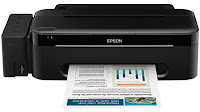
    We are very grateful for the visitors of this site for each day, increasing our writing may still be able to deliver benefits to all visitors. Here we will try to post about Resetter Epson L100 and how to use. Surely a lot of visitors where search for resetter Epson L100.


    Resetter Epson L100 and method of its use:
    To overcome Epson L100 Blink, you can use tha Resetter Epson L100 that you can download at the mediafire link:
    http://www.mediafire.com/?96qtt9s7n1yp4bt

    Resetter Epson L100 and method to use it:
    1. turn on Epson L100 and make sure the Epson L100 already connect with computer and installed the driver.
    2. then run the Resetter Epson L100, with a double click on the file "AdjProg cracked .exe"
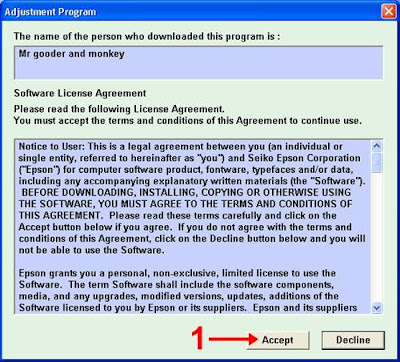
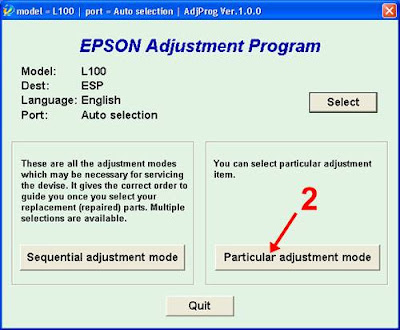
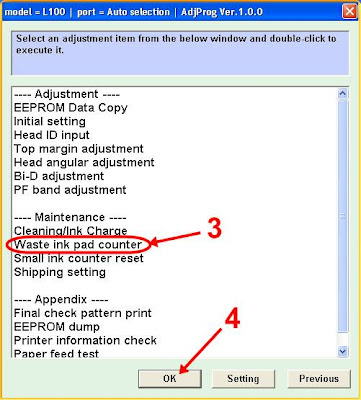
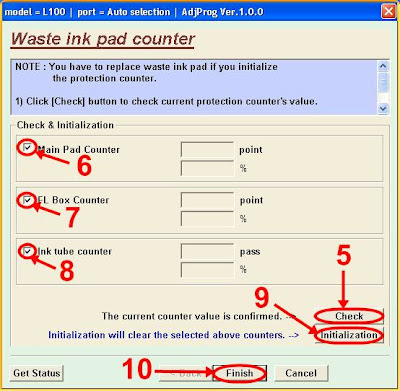
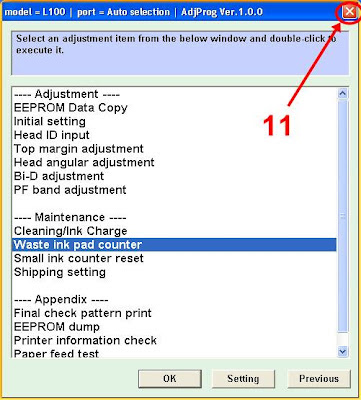
    3. click on "accept" >> "Particular Adjusment Mode" >> select "Waste ink pad Counter reset" >> click on "Check" check >> "main pad counter, FL box counter, Ink tube Counter", then click "Initialization" >> "Finish".


    4. the next step turn off Epson L100, and then disconnect the power cable.
    5. the last step is plug it back in and turn on the printer power cable, wait a few moments until Epson L100 will be back to normal.

    OK, so this way the use of resetter Epson L100, to the download Link resetter Epson L100 only via mediafire.

    Good luck.